Ark resource preview
Arkwright AI 101
A comprehensive field guide to practical AI adoption, tools, workflows, prompting, and measurement.

Author
Joe Draper
Founder, Arkwright
AI 101
This document is written for non-technical first-time users of AI, right through to devs who are comfortable with the basics. It should serve as a comprehensive introduction to AI, but also go into enough depth for experienced users to find valuable.
I’ll cover basic principles, lingo, different models & tools, best practices, possible use-cases, an overview of the AI landscape, and what the future likely has in store.
Core principles of LLMs
To a large extent, you don’t need to know how LLMs work - most people haven’t got a clue and can still get great outcomes. That said, it can be useful to know a few things to help steer your prompting & expectations: LLMs can be thought of as extremely well-read assistants with no common-sense.
They ‘know’ a lot of stuff, but don’t deal particularly well with ambiguity. They’re built to spot patterns in language and predict what comes next, meaning they can answer clearly defined questions very well - ‘get me a recipe for chocolate chip cookies’.
Modern LLMs sometimes have the ability to ‘think’. This is obviously not thinking in the human sense of the word, but it’s essentially a baked-in mechanism to sanity-check itself, make inferences and decisions more intelligently, and ‘read between the lines’ of what a user is actually asking.
This is often referred to as Chain-of-thought. Non-thinking LLMs may be trained on stronger worked examples produced by other models or humans, creating a feedback loop where techniques can transfer between model families over time.
That’s part of why many non-thinking LLMs can deal with a degree of uncertainty and still be useful for routine work. For most non-technical use cases, start with the default model in an approved ChatGPT, Claude, Gemini, or Microsoft Copilot plan, then upgrade only when you hit a clear limitation.
Thinking models (often available through paid subscriptions) are better at complex or specialist tasks with a higher degree of ambiguity, number crunching, multiple input documents/resources etc. Different models have different areas of speciality, in part due to the data that they’re trained on - this is not always by design, it just happens!
For example, Claude models are often evaluated for code generation and repository understanding. I’m going to include a breakdown of models below.
Terminology / Lingo
There’s a seemingly never-ending list of AI buzzwords to decode, so here are some of the biggest ones along with a layman’s overview.
Token
Tokens can be thought of as the 'puzzle pieces' of language that an AI model works with. They’re not exactly words - more like chunks of text.
Short words might be a single token, whereas longer words might be split into several. Punctuation and spaces are tokens too, since they add meaning and structure to a sentence.
LLMs work by predicting the most likely next token, based on the tokens they’ve already seen. Certain combinations of tokens often appear together in the training data, so when the model spots those patterns, it makes a prediction accordingly.

For example, in the screenshot above, the prompt mentions a man, a goat, a wolf, and a picnic by a river. Even though the question wasn’t about the Wolf, Goat, and Cabbage Problem, the model defaulted to solving it.
Why? Because in its training data, almost every time those tokens (man, goat, wolf, picnic, river) appeared together, they were part of that specific puzzle - so the most likely next step was to give that solution.
This shows one of the quirks of LLMs: they don’t truly ‘understand’ your question, they recognise token patterns and make the best statistical guess about what should come next. Sometimes that’s exactly what you want - and sometimes it makes them confidently wrong in amusing ways.
Hallucination
Following on from the token definition, hallucinations are where the token prediction mechanic goes wrong and returns something completely wrong. LLMs don’t ‘know’ facts like humans do, they only establish and predict patterns, and sometimes these predictions are wrong.

The screenshot above is a perfect, albeit fairly harmless example of hallucinations in action. There is no seahorse emoji, but many people seem to think there is, and this Mandela Effect has been discussed at length online.
The model has seen many mentions of ‘seahorse’ and ‘emoji’ together in training data, and assumes there must be one. LLMs generate text one token at a time.
Each next-token distribution is conditioned on everything already generated. Once the model says something, that statement itself becomes part of the evidence for what comes next.
The LLM ‘doubles down’ leading to the bizarre response in the image above. In serious contexts like medical or legal advice, hallucinations are a serious problem.
There may be niche topics without a large body of reliable sources that the LLMs can be trained on, meaning that when it’s asked a question about the topic, it’s more likely to ‘predict’ an answer from an unrelated area with similar token patterns/language used - leading to inaccuracies and made up answers.
Again, a tricky one to solve - the more niche or recent a topic, the more likely you are to encounter hallucinations. Attempts to solve this problem include ‘Grounding’: connecting the model to external sources such as search results, maps, databases, documents, or social feeds so it can check live context instead of relying only on learned patterns.
Chain-of-Thought
Think of this like an internal monologue, or ‘thinking out loud’. Most people break complex problems down into manageable steps and work through them bit-by-bit to arrive at an answer.
Reasoning models are basically LLMs with a baked in chain-of-thought. They take your question/ problem, and break it into steps by continuously re-prompting themselves - these re-prompts are similar to human thoughts - “Hmm, okay let’s do X first, then we’ll find Y”.
As we saw in the hallucination example above, every token the model generates helps to predict further tokens. If reasoning gives the model several ways to check the same problem, it has a better chance of catching weak assumptions before giving the final answer.
That does not make reasoning models automatically “better” for every job. They are worth testing when the task needs multi-step logic, careful comparison, calculation, or error-checking; for simple drafting or extraction, the extra cost and latency may not be justified.
Agent
A buzzword that seems to have grown in scope over time. In this context, an AI Agent is a system ‘driven’ by an LLM that can autonomously decide and execute actions toward a goal.
The key is goal-directed autonomy, not just prompt-in, response-out. Agents can be thought of as LLMs with extensive additional resources:
- ➢Memory — Can store and recall facts, be given a custom knowledge-base, set of rules
- ➢Tool Use — Can call APIs, databases, search engines, run scripts, external apps
- ➢Planning Loop — Doesn’t just answer; sets out sub-goals and works towards them
- ➢Autonomy — Doesn’t require hand-holding; give it a goal and it figures out the steps
- ➢State Awareness — Keeps track of what has been done and what’s left to do
- ➢Environment Hooks — Monitors file systems, messages and other triggers to decide when to act
All of these additional resources and environmental cues are fed into the model’s context window (see below) by some means or another, so the model can perceive the resources available to it, plan what to do next, execute with the tools it has, and iterate by repeating the cycle autonomously.
As an example, an article like this can be kept up-to-date with an agent - an LLM pulls the existing doc on a schedule, searches for relevant AI news, considers how much those developments affect the accuracy of the article, and sends a summary of suggested updates sorted by urgency.
Context Window
Context Window refers to the maximum amount of text an LLM can consider at once. A practical example of this could be asking an LLM to look through an enormous book and summarise the story - early LLMs might only cope with a short excerpt, while long-context models can be tested on book-length files, large document packs, or sizeable chunks of a codebase.
Think of this context like notes on a whiteboard - it’s not how much knowledge the model has in general, it’s more akin to short-term memory. War and Peace may have been part of the model’s training data, but our codebase wasn’t - the model needs that important context to build on it effectively.
For the majority of non-technical users, the context window will rarely ever be of consequence. The practical question is not the headline token limit, but whether the tool can find the right detail inside the material you gave it and explain where that detail came from.
Temperature
This is more for the devs or those who want to experiment. Temperature is a setting that’s predominantly, although not exclusively available for tuning LLMs via API.
It’s a control over how predictable or creative an AI’s responses are. Low temperature (e.g. 0-0.3) means the model plays it safe, picking the most likely next token almost every time.
Answers tend to be more factual and consistent. High temperature (e.g. 0.7-1) means the model takes more risks, exploring less likely token patterns.
This can causes responses to be more varied and creative, but sometimes weird or inaccurate. For creative writing, high temperatures can be great, but for most practical applications of LLMs, consistency and repeatability tend to be more important.
System Prompt
System prompt is an interesting one - they’re massively impactful and yet something most people won’t ever be aware of. It refers to a ‘hidden’ prompt given to an LLM prior to their interactions with the end-user.
The system prompt often provides the LLM with critical information about it’s role and purpose, what tools it has at it’s disposal, how to deal with requests, and a long list of rules for dealing with specific scenarios. You can read some leaked system prompts here: These system prompts are typically kept secret, with some even explicitly instructing the LLM to never provide them to the end-user.
That said, they sometimes leak and can tell us a lot about prompt engineering patterns used inside commercial products - including role framing, tool instructions, refusal rules, and examples of the style the model should imitate.
Retrieval-Augmented Generation (RAG)
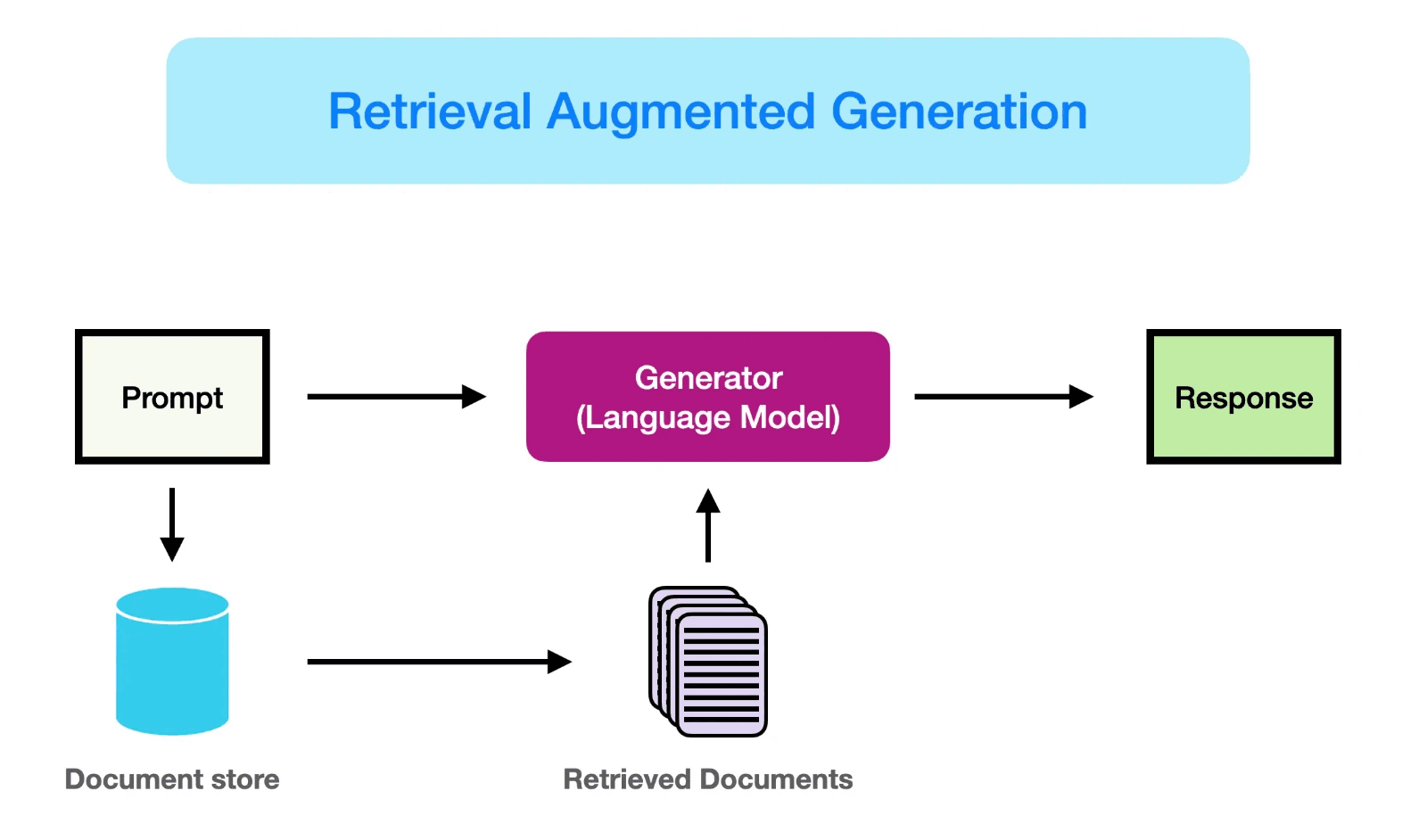
RAG is essentially a means to supplement the LLM’s training data with additional, often use- case specific resources. LLMs can first consider this additional context before providing an answer, only defaulting to training data when necessary.
Say for example you wish to build a chatbot to help employees find answers to internal policy questions. Given that these policies are private, the LLM won’t have been trained on them - but could easily interpret and relay them.
RAG gives the LLM access to this proprietary information, so that it can use it to better inform answers. RAG helps to reduces instances of hallucinations by providing addition qualitative sources for the LLM to pull from and by adding additional context to the user’s request.
On top of that, RAG bots can cite the source of their claim, allowing users to manually check if needed. RAG is a practical pattern for making LLMs more consistent and reliable at specific uses because it gives the model relevant material at the moment it needs it.
At Arkwright, we're experienced at building RAGs that are ‘experts’ in their respective fields - for example an LLM given a back catalogue of integration field mapping decisions so that it can deal with mapping future integrations more consistently.
Model Context Protocol (MCP)
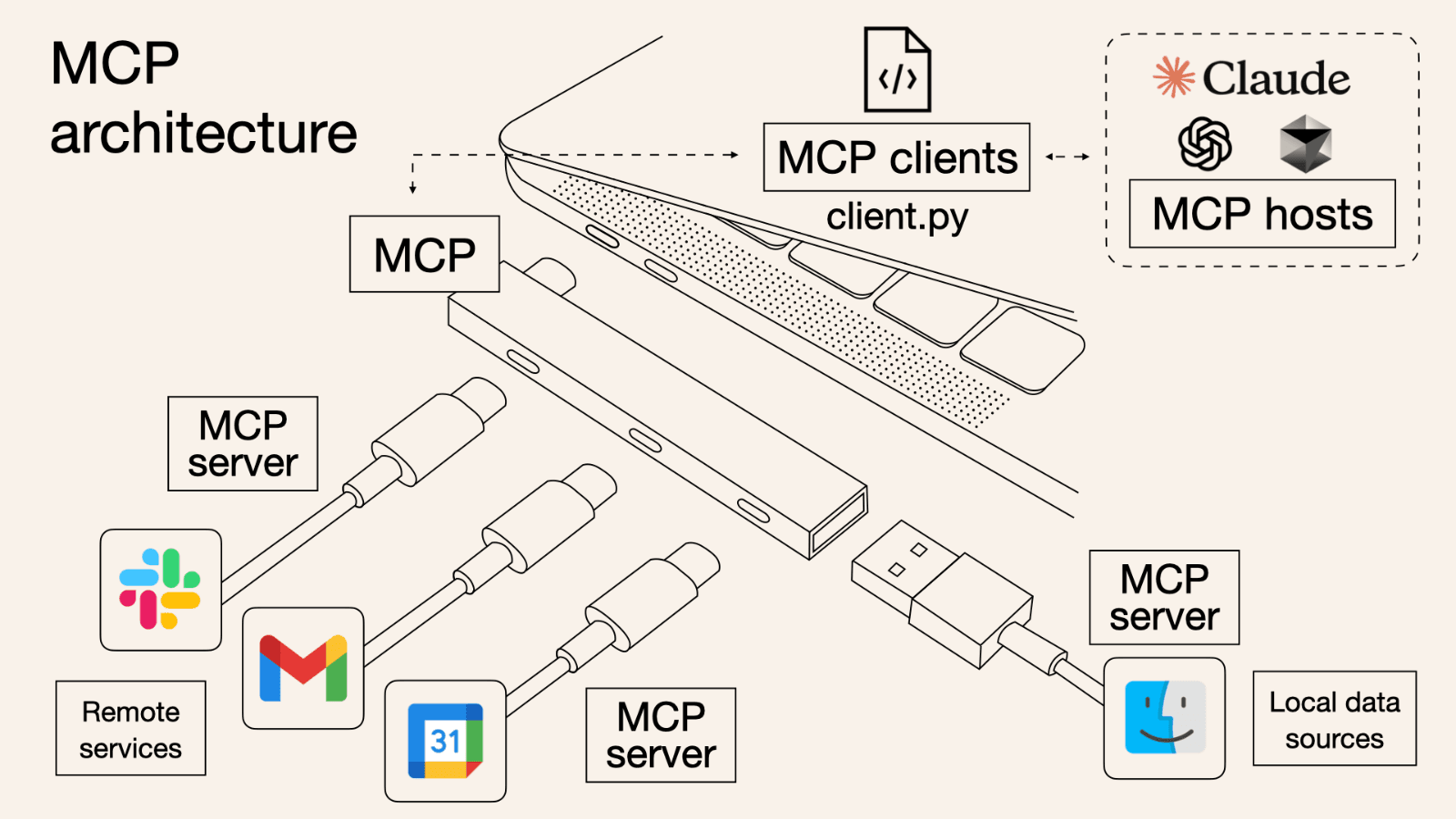
MCP is an open protocol/standard that seeks to make it easier for LLMs to pull data/context from external apps. MCP was developed by Anthropic, and they describe it as akin to the USB- C port of AI applications - a universal standard.
MCP follows a client-server architecture where MCP clients/hosts like Cursor or Claude Code can connect to MCP servers. Common server categories include file systems, internal documents, chat tools, source control, databases, and project-management systems. Aggregator-style tools also exist; evaluate them on permissions, auditability, and whether they make setup easier without hiding too much of the security model.
Businesses with customers who rely on their proprietary data may host MCP servers to expose it so that devs can quickly and easily provide that data to their LLMs. For example, if your customers need to integrate with your API, you may host an MCP server that provides technical documentation & an API reference - allowing the customer to integrate faster using AI.
Artificial General Intelligence (AGI)
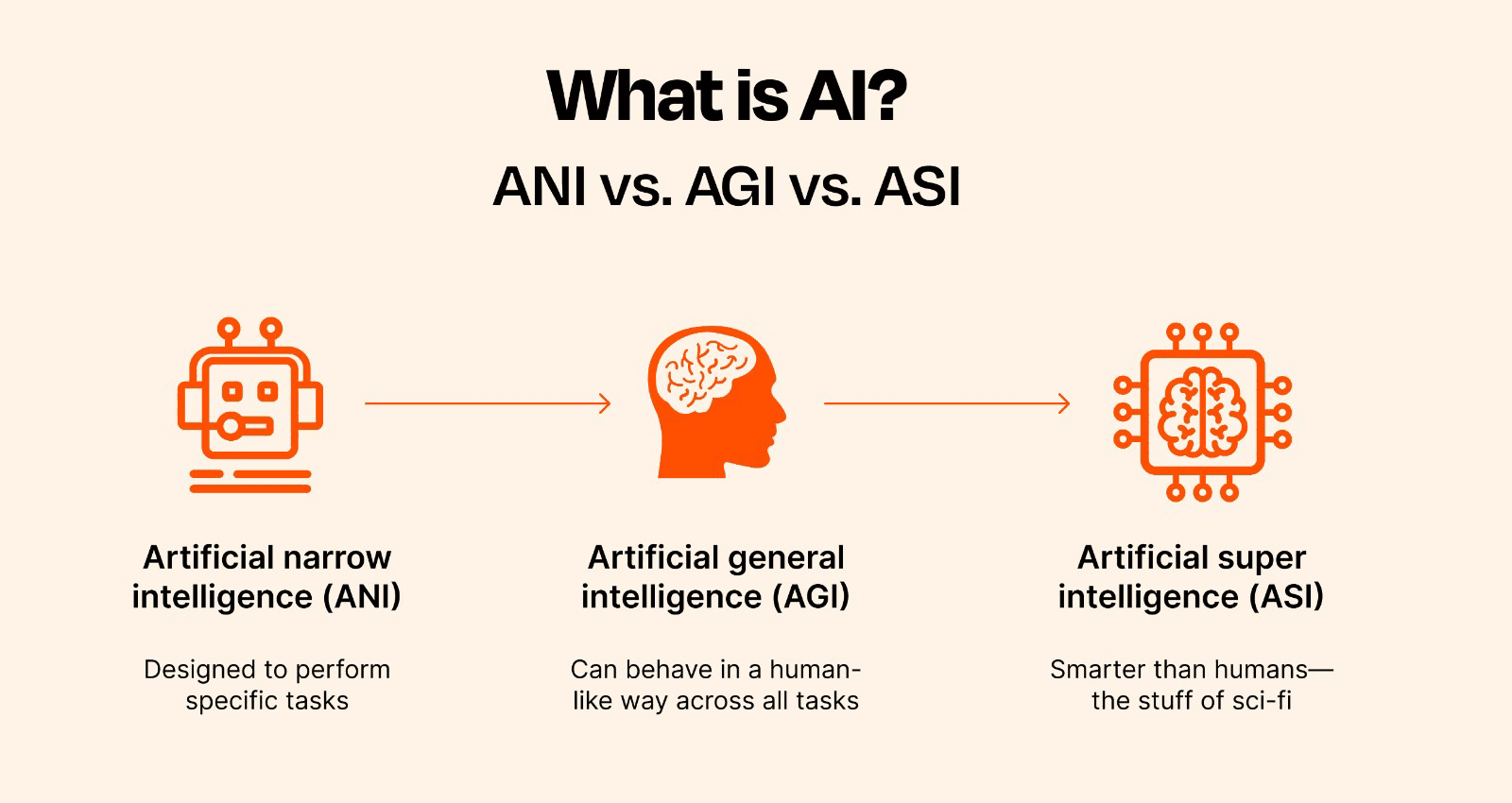
Think of this as the goal - it’s what every lab is working toward. What actually constitutes ‘AGI’ is up for debate, which doesn’t help - but it’s commonly thought of to mean an AI that’s as smart as a human at virtually all tasks.
The reason this is ‘not a super useful term’ is that it’s very loosely defined in practice - some people use capability alone as their threshold for AGI, while others argue that systems which still hallucinate and provide wildly off-base answers to simple questions cannot qualify.
The bottom line: AGI is a buzzword. It means something different to everybody.
In the same way chain-of-thought simulates reasoning, labs will continue to develop ways to mitigate blunders - but that doesn’t necessarily mean models will ever ‘think’, only get more consistent.
Getting Started - Choosing a Model
can be defined and categorized in a number of ways, but here are some of the key distinctions: Closed Source/Open Source - Is the model owned and operated behind closed doors by the lab that made it, or available publicly for anyone to download and run on their own hardware?
Reasoning/Non-reasoning - Does the model have a baked-in ‘chain of thought’ (CoT) where it quietly explores different ideas, tests possible answers, self-checks assumptions/ inferences? Some products also blur the line by deciding when to spend extra compute on reasoning and when to answer quickly.
Reasoning tends to involve increased latency & cost, and non-reasoning suffices for most tasks. Lightweight/Frontier - How big is the dataset upon which the model was trained?
How resource-intensive is it to run the model on local hardware? How reliable, ‘smart’ and capable is it?
Is it intended for simple, fast tasks, or complex, multi-step tasks? UI/API - Most non-technical users will be working with models through their respective UI’s i.e. chatgpt.com.
Sealed vault
Full access is included with Arkwright Fractional
Finding this useful? You've only read about 21% of the full resource. Reach out to unlock the full guide and the rest of the Ark.
Next steps
Put the resource into an operating workflow
Use this guide as a starting point, then map the smallest practical change in your team's tools, approvals, and measurement loop.
Related Ark resources
Industry applications
Want the full Ark unlocked?
Arkwright Fractional gives you complete access, plus hands-on support.